RESTful Services Authorization

Welcome, in this blog, we are going to talk about
Basics of securing RESTful Services
Protecting RESTful Services
Using Client to access protected RESTful Services
Basics again - but written in a different way 🤷♂️
I think I'm going to add this to my Blog Series called Things in APEX I've used for years, but not fully understood how they work.
Introduction
I wrote this blog to clear a few things up for me. The main question I had buzzing around was
Q. Why can any authenticated client access a module when it’s protected by a privilege, even if I haven’t explicitly granted that privilege to the client?
Well this blog describes that answer as
A. Since the Module is Protected by a Privilege, it only requires an Authenticated Client. If you need to authorize which Client Accesses which Module, then you need to assign roles.
And that is the golden answer.
Let's do this in table form:
| Access | Client | Privilege | Role |
|---|---|---|---|
| Open | ❌ | ❌ | ❌ |
| Protected | ✅ | ✅ | ❌ |
| Restricted to certain Clients | ✅ | ✅ | ✅ |
I did write a longer blog; but I tore it all down because everything is addressed in the table immediately above and the section immediately below.
Golden Rules
Rather than read the whole blog you can just read this section
Read this first!
Forget all about assigning Privileges to Clients. i.e.
❌ Don't assign Privilege(s) to Clients
❌ Don't create a Client with Privilege(s) - just create a client with a dummy value or null
p_privilege_names => 'EmptyPriv' -- Alternatively: => NULL
Want to protect a Module/Resource Template so that only Clients can use it?
Protecting a whole module? Create a privilege and then just whack the module it over to the right?

Protecting just some Resource Templates? Create a privilege and then use wildcards like these...

Want to protect a Module/Resource Templates so that only some Clients can use it?
Step by step...
Create a Role

Assign it to your Privilege

Assign the Role to your Client
BEGIN
  OAUTH.grant_client_role(
    'myClient',
    'MyRole'
    );
  COMMIT;
END;
Protecting Modules/Resource Template
Lets talk about how to protect stuff. The section after this is about how to use Clients to call your protected endpoints.
No Authorization
This is basically what it looks like when the Module isn't Protected by a Privilege (Basically, no client is needed)

Protect Modules by a Privilege
Create a Privilege and select the Module in Protected Modules
Your Module is now protected by a Privilege

All your Resource Templates under that module are now protected by a Privilege

Protect Resource Templates by a Privilege
Identify the Module that needs Protecting

Concatenate the Module Base Path and URI Template e.g. /hr/employees
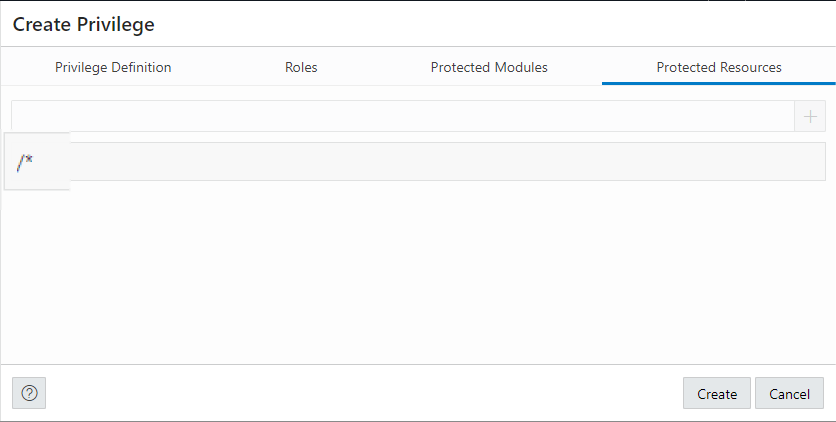
Create a Privilege and add the concatenation with a /* wildcard suffix to Protected Resources
Your Resource Templates are now protected by a Privilege

Your module is now partially protected by a Privilege

Protect Module/Resource Templates by a Privilege and Role
Create a role
In the privilege, select the role
Protect the Module/Resource Templates using a method above. In this example, I'll protect the Module
Protecting new Templates
If i create a Module /hr/newCoolThing it will be accessible by all (including clients) as its unprotected ❌
If i create a Privilege newCoolThingPriv protecting it with a ✅ , it will be accessible by all clients regardless of if they have that privilege or not.
If I assign the Privilege a Role; it will only be accessible by all clients with that Role assigned (regardless of if the Privilege is assigned to that client or not).
Protect Everything
Give this a read. It basically a slash-star wildcard protecting everything
Using Clients to Access Protected Services
Sorry - there's no APEX UI for Clients 😥
Create a Client
BEGIN
  OAUTH.CREATE_CLIENT(
    p_name => 'myClient',
    p_grant_type => 'client_credentials',
    p_description => 'Client description',
    p_support_email => 'your@email.com',
    p_privilege_names => 'EmptyPriv'
  );
  COMMIT;
END;
Obtain it's Credentials
SELECT client_id,
       client_secret
  FROM USER_ORDS_CLIENTS
 WHERE name = 'myClient';
Granting Roles to Clients
If the Privilege protecting the resource requires the client have a role, it may be granted like this.
BEGIN
  OAUTH.grant_client_role(
    'myClient',
    'MyRole'
    );
  COMMIT;
END;
If you need to check out what Roles your Client(s) have try this
SELECT client_name, role_name
FROM user_ords_client_roles
Test using Postman
Create a New Collection in Postman.
Under Authorization set up like this (check out the bit in Blue)

Where the Access Token URL is your URL ending in
/ords/followed by your RESTful Services Schema Alias e.gvfollowed by /oauth/tokene.g./v/oauth/tokenClick Get New Access Token > Use Token > Auto-refresh Token
Create a Request for Employees

How to I launch a full set of Roles protecting my modules
We just need to define which roles contain which privileges. Something like this (roles on the left, privileges on the right). Imagine this privileges protecting individual Resource Templates e.g GET, PUSH, POST, DELETE, etc
Role HR_MANAGER     → EMP_READ + EMP_WRITE + SALARY_VIEW + BONUS_VIEW
Role HR_CLERK       → EMP_READ
Role PAYROLL        → EMP_READ + PAYROLL_ADMIN
Role AUDITOR        → EMP_READ + SALARY_VIEW + BONUS_VIEW
then assign those roles to the client (clients on the left, roles on the right)
-- Grant roles to clients (simple 1-liner each)
oauth.grant_client_role('MANAGER_APP', 'HR_MANAGER');
oauth.grant_client_role('HR_CLERK_APP', 'HR_CLERK');
oauth.grant_client_role('PAYROLL_APP', 'PAYROLL');
oauth.grant_client_role('AUDITOR_APP', 'AUDITOR');
Then 6 months later we need to add a new /hr/performance/ handler. The define_privilege procedure will create the privilege (e.g. PERF_VIEW ) if it doesn't exist.
DECLARE
  l_roles OWA.VC_ARR;
BEGIN
  -- Add both roles to PERF_VIEW in one call
  l_roles(1) := 'HR_MANAGER';
  l_roles(2) := 'AUDITOR';

  ORDS.define_privilege(
    p_privilege_name => 'PERF_VIEW',
    p_roles => l_roles
  );
  COMMIT;
END;
/
The code above create the privilege (e.g. PERF_VIEW ) and assigns it to two existing roles. Those roles are associated with several privileges protecting the resources.
I still don't get it?
Remember
Privileges are Authentication
Roles are Authorization
OK one last time
Create a Module+Template
- Can I call it without a Client? ✅ Yes
Secure the Module/Template with a privilege
Can I call it without a Client? ❌ No
Can I call it with a Client? ✅ Yes
Add a Role to a privilege
Can I call it with a Client without that role ? ❌ No
Can I call it with a Client with that role ? ✅ Yes
Documentation
ENJOY!
What's the picture? Its the Yorkshire Dales Ice Cream Kiosk 🍦 in Harrogate. Visit Yorkshire!
About the author
With around 20 years on the job, Matt is one of the most experienced software developers at Pretius. He likes meeting new people, traveling to conferences, and working on different projects.
He’s also a big sports fan (regularly watches Leeds United, Formula 1, and boxing), and not just as a spectator – he often starts his days on a mountain bike, to tune his mind.
Comments
Join the discussionNo comments yet. Be the first to comment.